
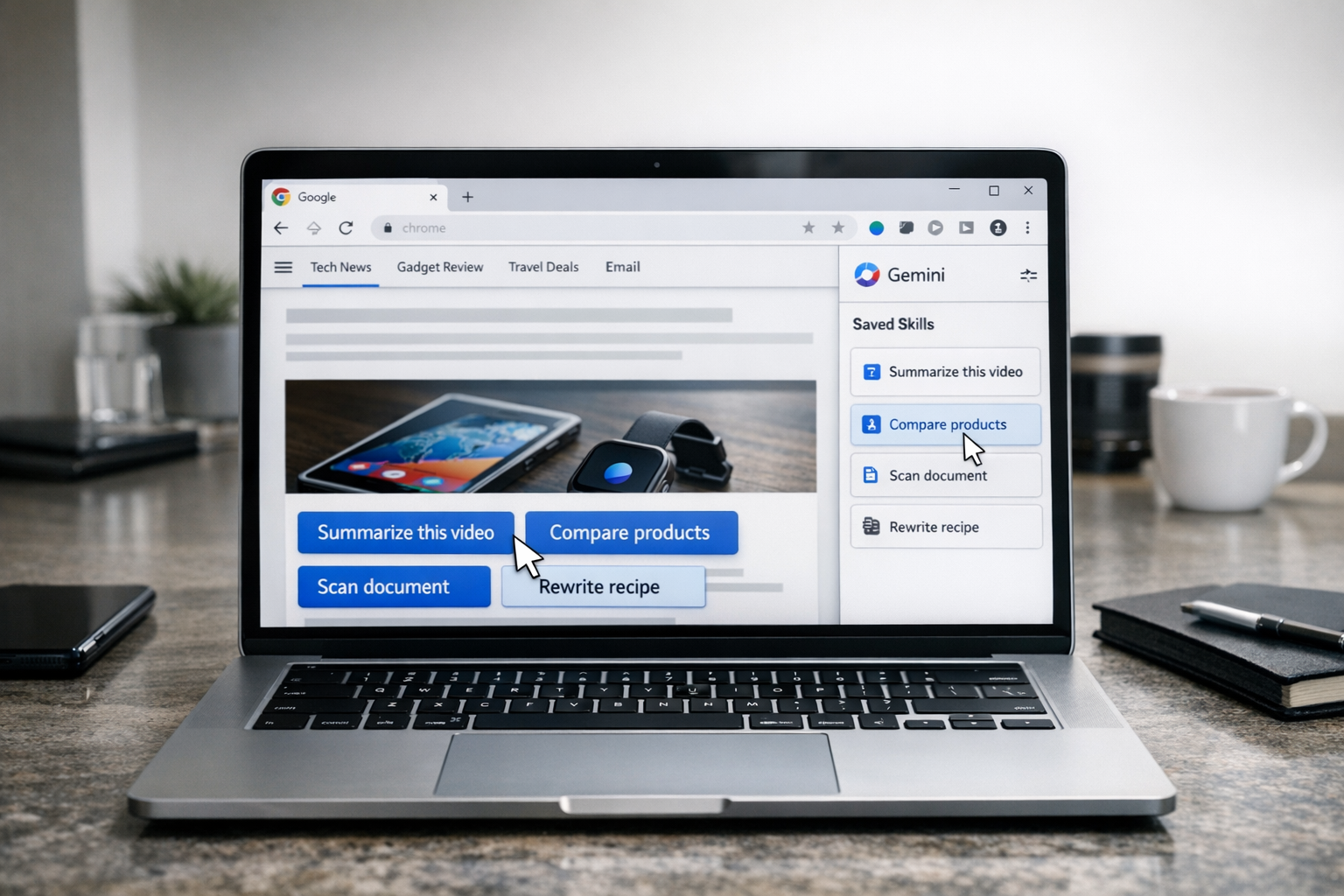
Google is turning one of artificial intelligence’s most awkward habits — typing the same instructions again and again — into a built-in feature of its most widely used browser.
This week, Google began rolling out a feature in Chrome called “Skills,” which lets people save frequently used Gemini prompts and replay them with a single click while browsing. The feature, introduced on April 14, 2026, allows users to pull a prompt from their Gemini chat history, save it as a reusable action, and apply it to the current page or a set of selected tabs.
The move may sound small, but it points to a larger ambition for Chrome. Google is no longer treating the browser merely as a window onto the internet or a place to bolt on an AI assistant. With Skills, Chrome begins to function more like a lightweight workflow engine where repeated AI tasks are converted into semi-structured tools.
From Prompt to Tool
For many users of generative AI, the problem is familiar: a prompt works well once, but then must be rewritten or pasted every time it’s needed. Google’s new feature is designed to turn those recurring instructions into reusable shortcuts.
Common use cases for Skills include:
-
Comparison: Comparing products across multiple open shopping tabs.
-
Summarization: Extracting the main points from a long YouTube video or document.
-
Formatting: Rewriting a recipe to increase protein content or adjusting the tone of a drafted email.
Google is also launching a Skills library with premade shortcuts for common tasks such as budgeting, document scanning, and technical spec comparisons. The rollout has begun for signed-in Chrome desktop users on Mac, Windows, and ChromeOS, with the initial language support set to U.S. English.
Chrome’s New Productivity Layer
Google first signaled this deeper Gemini integration at Google I/O 2025, pitching it as a desktop browsing assistant. Since then, the company has expanded the rollout to markets like India, Canada, and New Zealand, tying the assistant to services like Gmail, Drive, and Maps.
Skills represents the next step: nudging users toward repeatable routines. This is a strategic move in the “browser wars.” While competitors like OpenAI and Perplexity are pushing AI assistants that promise web navigation and research, Google’s advantage is distribution. By making these features native to Chrome, Google can normalize AI-driven workflows for billions of users without requiring them to install new software.
Useful, but Constrained
For now, Skills is closer to templated prompting than full autonomous automation. Google has specified that high-consequence actions — such as sending an email or adding a calendar event — still require explicit user confirmation.
This restraint reflects the tension in consumer AI: users want to save time, but they are often wary of “autonomous agents” acting on their behalf without oversight. By positioning Skills as a one-click reuse of prompts, Google offers the convenience of automation without the anxiety of losing control.
A Shift in How We Browse
The significance of the “Skills” rollout lies in the future of the browser itself. Browsers have traditionally been organized around pages, tabs, and bookmarks. Skills hints at a shift toward a model organized around intents:
“Compare these products,” “Summarize this video,” or “Scan this document.”
By turning prompts into repeatable actions, Google is betting that the future of AI depends less on spectacular demos and more on making repetitive digital chores disappear with a single click.
Sources
Further reading and reporting used to add context:
- https://techcrunch.com/2026/03/10/google-gemini-chrome-expands-to-india-canada-new-zealand/
- https://techcrunch.com/2026/04/14/google-adds-ai-skills-to-chrome-to-help-you-save-favorite-workflows/
- https://apnews.com/article/d4d9a95fd997f7feefd712a333ce5169
- Turn your best AI prompts into one-click tools in Chrome
- https://arstechnica.com/google/2026/04/google-introduces-skills-in-chrome-to-make-gemini-prompts-instantly-reusable/
- https://www.androidcentral.com/apps-software/chromes-gemini-ai-assistant-finally-breaks-out-of-the-us
- https://www.techradar.com/ai-platforms-assistants/gemini/gemini-is-coming-to-chrome-on-desktop-starting-today-for-pro-and-ultra-users-in-the-u-s
- Google is launching a Gemini integration in Chrome | TechCrunch
- https://workspaceupdates.googleblog.com/2025/09/gemini-in-google-chrome-admin-settings-available.html
- https://en.wikipedia.org/wiki/Project_Mariner
- https://www.tomsguide.com/computing/browsers/i-just-discovered-what-the-new-gemini-button-can-do-in-chrome-and-its-a-serious-time-saver
- https://www.reddit.com/r/Agent_AI/comments/1sm16tz/google_introduces_skills_in_chrome_to_make_gemini/
- https://cincodias.elpais.com/smartlife/lifestyle/2026-02-18/google-io-2026-fecha-oficial.html
- https://blog.google/products-and-platforms/products/workspace/gemini-workspace-updates-march-2026/
- https://www.reddit.com/r/chrome/comments/1rzjp25/fix_gemini_side_panel_ai_innovations_missing_in/
- https://www.reddit.com/r/chrome/comments/1rsf2q1/how_to_enable_gemini_in_chrome/
- https://www.mediapost.com/publications/article/409222/google-adds-gemini-to-chrome-ai-browsing-goes-mai.html
- https://www.seroundtable.com/skills-gemini-chrome-41146.html
- https://omni.se/google-tar-in-fler-ai-funktioner-i-chrome/a/8pBORr
- https://blog.google/technology/ai/google-ai-updates-september-2025/
- https://www.reddit.com/r/YesIntelligent/comments/1rqi9yu/google_brings_gemini_in_chrome_to_india/
- https://www.eweek.com/news/google-chrome-gemini-expansion-2026/
- https://www.reddit.com/r/GeminiAI/comments/1scc391/as_of_april_4th_2026_there_is_still_no_desktop/
- https://www.reddit.com/r/planhub/comments/1rr0gfk/google_just_turned_your_chrome_browser_into_a/
- https://theagenttimes.com/articles/google-chrome-skills-turn-saved-prompts-into-reusable-agent–b3096b63
- https://www.reddit.com/r/chrome/comments/1ro1pf4/gemeni_in_chrome_suddenly_gone_in_canada/
- https://www.reddit.com/r/Bard/comments/1kwl03f/why_no_gemini_in_chrome/
- https://www.reddit.com/r/chromeos/comments/1qrfocp/gemini_for_chrome_for_chromebooks/
- https://support.google.com/chrome/answer/16283624
- https://support.google.com/gemini/?hl=lo
- https://support.google.com/gemini/?hl=am
- https://support.google.com/gemini/?hl=en-IN
- https://support.google.com/a/answer/14571493?hl=en-Q4-googlecalendar_supportpage_Product-Education&ref_topic=13853688
- https://support.google.com/gemini/?hl=en
- https://support.google.com/gemini?hl=en-gb&jid=5288930114617748420-NC
- https://support.google.com/a/answer/14571493?co=DASHER._Family%3DEducation&hl=en-UG
- https://support.google.com/gemini/?hl=en-ID
- https://support.google.com/a?hl=en-SG&p=edu_supported_editions
- https://support.google.com/gemini/?hl=en-IE
- https://support.google.com/chrome/answer/16283624?hl=en-AU








Leave a Reply